Fluve offers five kinds of SMS messaging programs, described below. Message and data rates may apply. You can opt out of any program at any time by replying STOP to any message you receive.
1. Sign-in verification codes
If you choose to sign in or create an account using your phone number, we send a one-time 6-digit verification code by SMS. You opt in by checking the consent box shown before we send that code -- it is never pre-checked, and we don't send this message unless you've agreed. Message frequency: one message per sign-in attempt. Reply STOP to opt out, HELP for help.
2. Task assignment notifications
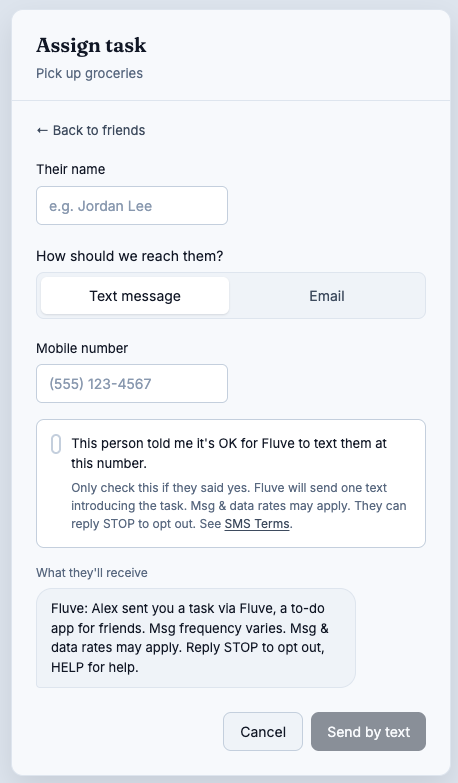
If a Fluve user assigns a task to someone who doesn't have a Fluve account, we send that person's phone number a one-time text describing the task and how to respond. Opt-in for this program works differently, since the recipient hasn't created an account: the Fluve user assigning the task confirms, at the time of assignment, that they have that person's permission to text them. The first message always identifies Fluve, states its purpose, and includes opt-out instructions.
Sample message ({assignerName} is the assigner's name and {taskTitle} the task's title, both shortened):
Fluve: {assignerName} assigned you a task on Fluve, a task app for friends: "{taskTitle}". Join: {link} (code {code}). Reply here with questions or DONE. Msg & data rates may apply. Reply STOP to opt out, HELP for help.
This is what the assignment screen and its permission confirmation look like:
Message frequency: varies based on how many tasks are assigned to you; typically no more than a few per week.
3. Friend invitations
If a Fluve user invites a friend by phone number, we send that number one text per invitation, containing a link to accept and a six-character invite code. As with task notifications, the recipient hasn't created an account, so the Fluve user sending the invite confirms, before it is sent, that they have that person's permission to text them. The message always identifies Fluve and the person who invited you, and includes opt-out instructions.
Sample message ({inviterName} is the sender's name, shortened):
Fluve: {inviterName} invited you to be friends on Fluve, a task app for friends. Join: {link} (code {code}). Msg & data rates may apply. Reply STOP to opt out, HELP for help.
Message frequency: one text per invitation.
4. Team invitations
If an owner or admin of a Fluve team invites someone by phone number, we send that number one text per invitation, containing a link to join the team. As with friend invitations, the recipient hasn't created an account, so the Fluve user sending the invite confirms, before it is sent, that they have that person's permission to text them. The message always identifies Fluve, the person who invited you and the team, and includes opt-out instructions.
Sample message ({inviterName} is the sender's name and {teamName} the team's name, both shortened):
Fluve: {inviterName} invited you to join the team {teamName} on Fluve, a task app for friends. Join: {link} Msg & data rates may apply. Reply STOP to opt out, HELP for help.
Message frequency: one text per invitation.
5. Replying to a task text
If you were texted about a task, you can reply to that text. These reply words work on their own: DONE marks the task done, DECLINE declines it and UNDO reopens the task you last finished or declined by text (within 24 hours, if nobody has changed it since). STOP, START and HELP work as described in section 6.
You can also reply in your own words, such as “all done, it was easy” or “can't, I'm away that week”. We use an AI model to read that reply and work out which task you mean and whether you are finishing it, declining it, reopening it or only adding a comment. The text of your reply, your recent messages with us and the details of your open tasks (title, due date, who assigned it) are sent to Anthropic, our AI provider, for this and for nothing else. If the AI result is unclear, we only add your words to the task as a comment and change nothing else. If you have several open tasks and we can't tell which one you mean, we text you a numbered list to choose from.
We answer a reply with a short confirmation, for example:
Fluve: Marked "Pick up the cake" done. Reply UNDO to reopen.
Message frequency: at most one text per reply you send. We never text you in answer to a reply you didn't send.
6. Opting out and getting help
Reply STOP to any Fluve text message at any time to stop receiving further messages on that number. Reply HELP for assistance, or contact support@fluve.app.
7. Carriers
Supported carriers include, but are not limited to, AT&T, T-Mobile, and Verizon. Carriers are not liable for delayed or undelivered messages.
8. Related policies
See our Terms of Service and Privacy Policy for how we handle your information.